For gamers, a PlayStation controller is more than just an accessory—it is the connection between the player and the game. Whether you’re battling opponents online, exploring open worlds, or competing in sports simulations, a properly functioning controller is essential for an enjoyable gaming experience. Unfortunately, PlayStation controllers can develop problems over time due to heavy use, accidental drops, wear and tear, or internal component failures.
If you’ve been searching for “best PlayStation controller repair near me,” you’ve come to the right place. At Cell Phone Quick Fix in Decatur, GA, we provide professional repair services for PS4 and PS5 controllers, helping gamers restore performance without the expense of purchasing a brand-new controller.
In this guide, we’ll discuss common PlayStation controller issues, repair options, warning signs that indicate your controller needs service, and why professional repair is often the smartest choice.
Common PlayStation Controller Problems
Modern PlayStation controllers are sophisticated devices packed with sensitive components. While they are designed for durability, frequent gaming sessions can eventually cause wear and performance issues.
Stick Drift
Stick drift is one of the most common controller problems. It occurs when the analog stick sends movement signals even when you’re not touching it.
Symptoms include:
- Characters moving on their own
- Camera angles shifting unexpectedly
- Difficulty aiming accurately
- Unwanted movement during gameplay
Stick drift can significantly impact gaming performance and often requires professional repair or analog stick replacement.
Unresponsive Buttons
Buttons may stop responding due to dirt buildup, worn contacts, or internal damage.
Common symptoms include:
- Delayed button responses
- Buttons sticking during gameplay
- Certain buttons not registering presses
- Inconsistent controller performance
Professional cleaning and component replacement can often restore functionality.
Charging Issues
If your controller refuses to charge, several problems could be responsible.
Possible causes include:
- Damaged charging ports
- Battery failure
- Internal circuit damage
- Charging cable issues
A professional technician can diagnose the exact cause and perform the necessary repairs.
Connectivity Problems
Wireless controllers rely on stable Bluetooth communication.
Signs of connectivity issues include:
- Frequent disconnections
- Pairing failures
- Input lag
- Limited wireless range
Connectivity problems often require internal component diagnostics and repairs.
Trigger and Bumper Damage
The L1, L2, R1, and R2 buttons experience heavy use and can become damaged over time.
Common issues include:
- Broken triggers
- Loose buttons
- Reduced responsiveness
- Physical damage from drops
Replacing damaged trigger mechanisms can restore controller performance.
Thumbstick Wear
After extended use, thumbsticks may become worn or damaged.
Signs include:
- Torn rubber grips
- Reduced comfort
- Slipping during gameplay
- Difficulty controlling movement
Thumbstick replacement can make your controller feel like new again.
Why PlayStation Controllers Fail
Many gamers wonder why controller problems develop despite careful use.
Heavy Daily Usage
Gaming for several hours daily naturally places stress on controller components.
Analog sticks, buttons, and triggers experience thousands of movements each gaming session.
Accidental Drops
Dropping a controller can damage internal circuits, trigger mechanisms, and connection points.
Even if external damage appears minor, internal issues may develop over time.
Dust and Debris
Dust, dirt, food particles, and debris can enter controllers and affect performance.
This often leads to:
- Sticky buttons
- Connectivity issues
- Reduced responsiveness
- Internal wear
Moisture Exposure
Liquids can cause severe damage to electronic components.
Even small amounts of moisture can create:
- Corrosion
- Short circuits
- Battery damage
- Connectivity failures
Battery Aging
Rechargeable batteries lose capacity over time.
Older batteries may result in:
- Shorter play sessions
- Charging failures
- Unexpected shutdowns
- Poor performance
PS4 Controller Repair Services
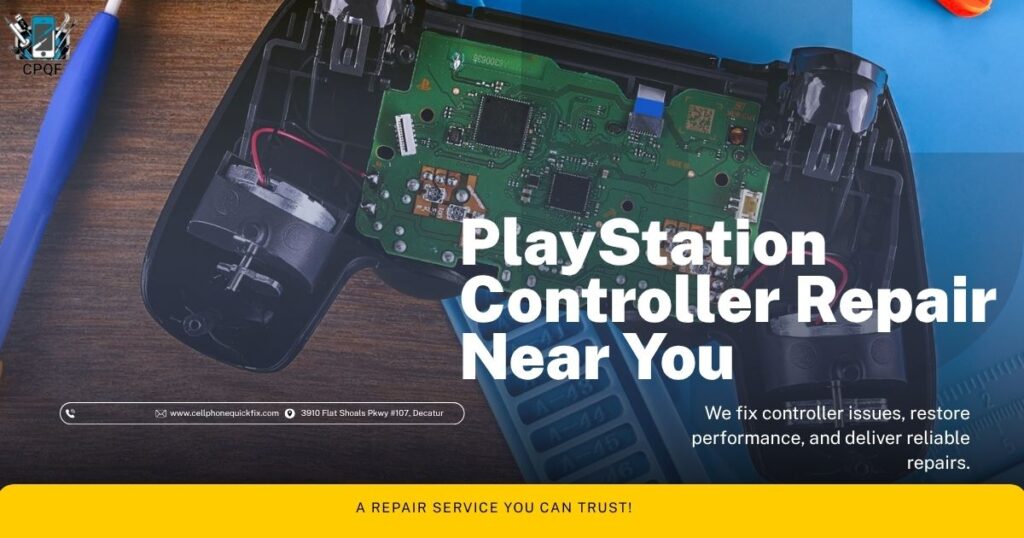
The PlayStation 4 remains one of the most popular gaming consoles ever released.
Many gamers continue using DualShock 4 controllers, making repairs an excellent alternative to replacement.
Common PS4 controller repairs include:
- Analog stick replacement
- Charging port repair
- Battery replacement
- Trigger repair
- Button restoration
- Bluetooth connectivity repair
- Internal cleaning
- Circuit board diagnostics
Professional repairs can extend the life of your PS4 controller significantly.
PS5 Controller Repair Services
The DualSense controller introduced innovative features including adaptive triggers and advanced haptic feedback.
While these features improve gaming experiences, they also add complexity to repairs.
Common PS5 controller repairs include:
- Stick drift correction
- Adaptive trigger repair
- Charging port replacement
- Battery replacement
- Thumbstick replacement
- Button repairs
- Internal diagnostics
- Connectivity troubleshooting
Expert repair technicians understand the unique design of DualSense controllers and can restore functionality safely.
Benefits of Professional PlayStation Controller Repair
Many gamers consider replacing a controller when problems arise.
However, professional repair offers several advantages.
Cost Savings
Repairing a controller is often significantly less expensive than purchasing a new one.
This is especially beneficial for premium controllers.
Faster Solution
Finding a replacement controller may take time.
Repairs often restore functionality quickly, allowing you to return to gaming sooner.
Preserving Custom Controllers
Many gamers invest in custom colors, modifications, or limited-edition controllers.
Repairing these controllers preserves their value and uniqueness.
Environmental Benefits
Repairing electronics reduces electronic waste and promotes sustainability.
Choosing repair helps keep functional devices out of landfills.
Professional Diagnosis
A technician can identify underlying issues that may not be immediately obvious.
This ensures all problems are addressed properly.
Signs Your Controller Needs Immediate Repair
Don’t ignore these warning signs:
Persistent Stick Drift
Minor drift often worsens over time.
Early repair can prevent additional wear.
Battery Draining Quickly
Rapid battery loss often indicates aging battery cells.
Replacing the battery can restore normal performance.
Frequent Disconnections
Connection problems can interrupt gaming sessions and indicate internal hardware issues.
Physical Damage
Cracks, loose buttons, or damaged triggers should be repaired before further damage occurs.
Charging Problems
Ignoring charging issues can eventually leave your controller unusable.
DIY Repair vs Professional Repair
Many online tutorials promote DIY controller repair.
While minor cleaning may be possible at home, professional service offers significant advantages.
Risks of DIY Repairs
Potential risks include:
- Damaging delicate components
- Voiding warranties
- Losing small parts
- Incorrect reassembly
- Additional repair costs
Advantages of Professional Repairs
Professionals use:
- Specialized tools
- Proper diagnostics
- Quality replacement parts
- Safe repair procedures
- Technical expertise
For most gamers, professional repair is the safest and most reliable solution.
How the Repair Process Works
At Cell Phone Quick Fix, our repair process is designed for convenience and reliability.
Step 1: Device Inspection
Our technicians inspect your controller and identify all issues.
Step 2: Diagnosis
We determine the root cause of the problem.
Step 3: Repair
Necessary components are repaired or replaced using quality parts.
Step 4: Testing
Controllers undergo extensive testing to ensure proper functionality.
Step 5: Customer Pickup
Your controller is returned ready for gaming.
Why Choose Cell Phone Quick Fix?
Gamers throughout Decatur trust Cell Phone Quick Fix because we focus on quality repairs and excellent customer service.
Reasons customers choose us include:
- Experienced technicians
- Fast turnaround times
- Affordable pricing
- Quality replacement parts
- Friendly customer service
- Convenient location
- Reliable repair solutions
Whether you’re experiencing stick drift, charging issues, connectivity problems, or broken buttons, our team is ready to help.
Serving Decatur and Nearby Communities
Our repair services are available to customers throughout:
- Decatur, GA
- Snapfinger
- Wesley Chapel
- Panthersville
- Belvedere Park
- Candler-McAfee
- Nearby DeKalb County communities
We proudly support local gamers with professional repair services they can trust.
Tips to Extend Controller Lifespan
Protect your investment by following these maintenance tips:
Keep Controllers Clean
Regularly wipe down your controller to remove dirt and oils.
Avoid Drops
Store controllers safely when not in use.
Use Proper Charging Practices
Avoid low-quality charging cables and overcharging whenever possible.
Store in a Safe Location
Protect controllers from dust, moisture, and extreme temperatures.
Address Issues Early
Repair minor problems before they become major failures.
Conclusion
If you’re searching for PlayStation controller repair near me, Cell Phone Quick Fix provides trusted PS4 and PS5 controller repair services in Decatur, GA. From stick drift and charging issues to button failures and connectivity problems, our experienced technicians can diagnose and repair a wide range of controller issues.
Don’t spend unnecessary money replacing a controller that may be repairable. Let our experts restore your controller’s performance so you can get back to enjoying your favorite games.
Visit Cell Phone Quick Fix today or contact us to learn more about our PlayStation controller repair services.
Cell Phone Quick Fix
3910 Flat Shoals Pkwy #107, Decatur, GA 30034
Phone: (404) 748-4459