The Xbox Series X is designed to deliver high-quality gaming with fast performance, impressive graphics, and smooth 4K gameplay. But even a powerful gaming console can develop hardware problems. One of the most frustrating issues for Xbox Series X owners is an HDMI port that stops working.
If your Xbox Series X powers on but your TV displays a black screen or “No Signal,” the HDMI port or its surrounding connections may be damaged. A loose HDMI connection, bent pins, physical impact, worn-out port, or motherboard-level damage can prevent the console from sending video and audio to your display.
The good news is that an HDMI problem does not automatically mean you need to replace your entire console. Professional Xbox Series X HDMI port repair can often restore the console when the damage is limited to the HDMI port or related motherboard connections.
At CellphoneQuickFix in Decatur, Georgia, technicians provide board-level gaming console repair using precision micro-soldering techniques. This type of repair focuses on diagnosing the underlying hardware problem and restoring damaged connections rather than simply replacing the entire console.
What Is an Xbox Series X HDMI Port?
The HDMI port on an Xbox Series X is the primary connection between the console and your television, monitor, or compatible display. HDMI carries both digital video and audio, allowing your Xbox to communicate with the display and deliver the gaming experience you expect.
Because the HDMI port is physically exposed, it can be vulnerable to damage. Every time you connect or disconnect an HDMI cable, mechanical pressure is placed on the port. Repeated use, accidental impact, pulling on the cable, or inserting a connector at an angle can eventually cause problems.
Unlike software issues, physical HDMI damage generally cannot be fixed through a system reset or settings adjustment. When the port or motherboard connections are damaged, professional hardware repair may be necessary.
Common Signs of Xbox Series X HDMI Port Damage
An HDMI problem can appear in several different ways. Sometimes the symptoms are obvious, while other times they can initially look like a television, cable, or software problem.
Here are some common signs that your Xbox Series X may have an HDMI-related hardware issue:
1. Black Screen
Your Xbox Series X powers on normally, but nothing appears on the television. The console may seem to be running even though the display remains completely black.
A black screen can have multiple causes, so proper diagnosis is important. However, physical HDMI damage is one possibility, especially if the problem occurred after moving the console or connecting an HDMI cable.
2. “No Signal” Message
If your television displays “No Signal” after you turn on your Xbox Series X, the console and display may not be establishing a proper HDMI connection.
Before assuming the port is damaged, it is worth checking the HDMI cable, television input, and another compatible display. If those components work correctly but the Xbox still produces no signal, the console’s HDMI hardware may require inspection.
3. Intermittent Display
An Xbox HDMI port does not always fail completely. Sometimes the picture appears and disappears when the HDMI cable moves.
You may notice that the display works when the cable is positioned at a particular angle but loses the signal when the cable is touched or moved. This can indicate a loose or damaged port or compromised solder connections.
4. Damaged or Loose HDMI Port
Physical inspection may reveal that the HDMI port is visibly loose, bent, pushed inward, or otherwise damaged.
If the connector does not feel secure when you insert the cable, avoid repeatedly forcing or adjusting it. Continued pressure can potentially make existing motherboard damage worse.
5. Audio and Video Problems
Because HDMI carries both video and audio, hardware damage can potentially affect one or both signals. You may experience missing video, missing audio, unstable output, or complete loss of communication with the display.
Why Does an Xbox Series X HDMI Port Get Damaged?
HDMI ports are built to handle normal use, but they are still physical connectors. Several situations can lead to damage.
Accidental Impact
A console can be bumped or moved while an HDMI cable is connected. Because the cable extends outward from the console, an impact can transfer force directly to the port.
Even if the outside of the console looks fine, the internal connections around the HDMI port may be affected.
Pulling or Twisting the Cable
Removing an HDMI cable by pulling aggressively or twisting it sideways can put unnecessary stress on the connector.
Over time, repeated mechanical stress may weaken the port or its solder connections.
Incorrect Cable Insertion
HDMI connectors are designed to fit in one orientation. Attempting to insert the connector incorrectly or forcing it into the port can damage the internal pins or connector housing.
Frequent Plugging and Unplugging
Regularly connecting and disconnecting HDMI cables is normal, but excessive mechanical use can contribute to wear. This is particularly relevant when a console is frequently moved between televisions, monitors, capture devices, or other setups.
External Pressure
A console positioned in a crowded entertainment center may have limited space around its ports. If an HDMI cable is sharply bent or pressed against a wall or cabinet, the pressure can be transferred to the connector.
HDMI Cable vs. HDMI Port: How Can You Tell the Difference?
Not every Xbox “No Signal” problem requires an HDMI port repair.
A faulty HDMI cable can produce symptoms that look almost identical to a damaged console port. That is why troubleshooting should begin with simple possibilities before assuming motherboard damage.
Try connecting your Xbox Series X with a known-good HDMI cable. Make sure the cable is fully inserted into both the Xbox and the television.
You should also verify that your television is set to the correct HDMI input. If possible, test the Xbox with another compatible television or monitor.
If the same problem continues with multiple cables and displays, the console itself may require professional diagnosis.
At CellphoneQuickFix, technicians can inspect the console and determine whether the problem is related to the HDMI port, its connections, or another component.
What Is Board-Level Xbox Repair?
Board-level repair is a specialized electronics repair process that focuses on components and connections on the device’s motherboard.
Instead of treating the entire console as a single replaceable unit, a board-level technician works directly with the circuitry responsible for the problem.
For HDMI issues, this can involve inspecting the HDMI connector, solder joints, surrounding components, and related circuitry.
Because these components are small and closely positioned, board-level work requires appropriate equipment, technical knowledge, and careful handling.
What Is Micro-Soldering?
Micro-soldering is a precision electronics repair technique used to work with small components and connections on circuit boards.
The HDMI port is physically connected to the console’s motherboard through multiple points. If these connections are damaged, a technician may need to perform precision soldering work to restore the connection.
This is very different from simply plugging in a new HDMI cable.
Micro-soldering requires controlled technique and specialized equipment. The technician must carefully identify damaged areas, remove or repair the affected components, and ensure that the board is not unnecessarily damaged during the process.
For this reason, HDMI motherboard repair is best handled by technicians experienced in board-level electronics repair.
What Happens During an Xbox Series X HDMI Repair?
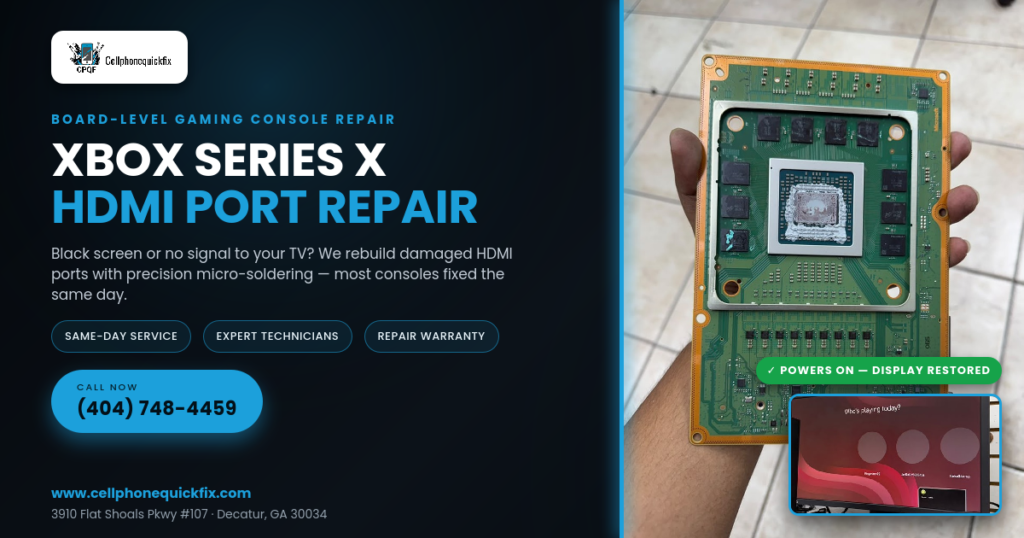
A professional repair generally begins with diagnosis rather than immediately replacing parts.
Step 1: Initial Inspection
The technician examines the console and listens to the customer’s description of the problem.
Important information can include when the problem started, whether the console was dropped or moved recently, whether the HDMI port feels loose, and whether the display ever works intermittently.
Step 2: HDMI Port Inspection
The HDMI connector is inspected for visible damage, bent pins, looseness, or other abnormalities.
The technician may also examine the area surrounding the connector for signs of physical impact or damaged connections.
Step 3: Board-Level Diagnosis
If the problem appears to extend beyond the connector itself, the motherboard may require more detailed inspection.
This helps determine whether the repair involves the HDMI port, solder connections, or other related circuitry.
Step 4: Precision Repair
Once the source of the problem has been identified, the appropriate repair can be performed.
Depending on the condition of the console, this may involve HDMI port replacement, repairing damaged solder connections, or addressing other board-level issues.
Step 5: Testing
After the repair, the console should be tested to verify that the HDMI output is functioning correctly.
Testing is an important part of the process because repairing a physical connector is only one part of restoring a reliable gaming system. The console should be checked with an appropriate display to confirm proper video output.
Why Professional HDMI Repair Matters
It may be tempting to attempt an HDMI port repair at home, especially after watching online repair videos. However, Xbox Series X motherboards contain delicate electronic components and tightly positioned connections.
An inexperienced repair attempt can potentially cause additional damage.
Using excessive heat, applying too much force, damaging nearby components, or lifting motherboard traces can turn a relatively straightforward connector problem into a much more complicated repair.
Professional technicians have the tools and experience necessary to work with small electronic connections more safely and accurately.
Should You Replace Your Xbox Series X Instead?
When a console stops displaying an image, some owners immediately assume that replacement is the only option.
That is not necessarily the case.
If the underlying problem is limited to the HDMI port or related connections, professional repair may be worth considering before purchasing another console.
The best option depends on the extent of the damage, the condition of the console, and the results of a professional diagnosis.
A repair shop can inspect the console and explain the available options before work begins.
Benefits of Xbox Series X HDMI Port Repair
Choosing professional repair can provide several advantages.
Preserve Your Existing Console
If your Xbox is otherwise functioning correctly, repairing the HDMI issue can allow you to continue using the console you already own.
Avoid Unnecessary Replacement
A damaged connector does not necessarily mean the entire gaming system has failed. Diagnosing and repairing the affected hardware can be a more practical approach in appropriate cases.
Board-Level Expertise
Board-level technicians can investigate problems that cannot be solved through basic troubleshooting.
Convenient Local Service
For gamers in Decatur, GA, having access to a local repair shop can make the process more convenient than shipping a console away for service.
Testing After Repair
A professional repair process should include testing to verify that the repaired HDMI connection is working properly.
How to Protect Your Xbox Series X HDMI Port
Prevention can help reduce the chance of future HDMI damage.
Handle HDMI Cables Carefully
Always connect and disconnect the HDMI cable gently. Avoid pulling the cable sideways or putting unnecessary pressure on the connector.
Avoid Sharp Bends
Do not force the HDMI cable into a tight space. Excessive bending near the connector can create unnecessary stress.
Leave Adequate Space
Position your Xbox Series X so there is enough room around the rear ports. Avoid placing the console where connected cables are pressed against a wall or furniture.
Do Not Force the Connector
If the HDMI cable does not fit easily, check its orientation. Never force the connector into the port.
Minimize Unnecessary Movement
If your Xbox is connected to a permanent gaming setup, avoid frequently moving the console while the HDMI cable remains connected.
Check the Port if Something Feels Wrong
If the HDMI connection suddenly becomes loose or the display starts cutting out, have the console inspected instead of repeatedly moving the cable to make it work.
When Should You Stop Using the Console?
If the HDMI port is visibly damaged or the connector feels unusually loose, continued use may not be advisable.
Repeatedly plugging and unplugging a damaged connector can potentially increase mechanical stress on the surrounding connections.
If you notice a black screen, intermittent signal, or a port that appears physically damaged, start with basic cable and display troubleshooting. If the problem continues, professional diagnosis can help identify the actual cause.
Xbox Series X HDMI Repair in Decatur, GA
If you are searching for Xbox Series X HDMI repair in Decatur, GA, CellphoneQuickFix provides specialized gaming console repair services at its local location on Flat Shoals Parkway.
The repair team handles electronics and gaming-device problems using professional diagnostic and repair techniques. For HDMI-related issues, board-level repair and precision micro-soldering may be used when appropriate.
The goal is to identify the actual hardware problem and restore the console’s display functionality whenever the device is repairable.
Local Repair Location
CellphoneQuickFix
3910 Flat Shoals Pkwy #107
Decatur, GA 30034
Phone: (404) 748-4459
Website: www.cellphonequickfix.com
Whether your Xbox Series X has a damaged HDMI port, black screen, intermittent signal, or another display problem, bringing the console to a professional repair shop can help you determine the next step.
Common Questions About Xbox Series X HDMI Repair
Can a damaged Xbox Series X HDMI port be repaired?
In many cases, a damaged HDMI port can be repaired or replaced. The exact repair depends on the condition of the connector and the motherboard. A professional inspection is recommended before determining the repair method.
Why does my Xbox Series X turn on but show no picture?
There are several possible causes, including an HDMI cable problem, incorrect television input, display compatibility issues, HDMI port damage, or other hardware problems. Testing the cable and display first can help eliminate simple causes.
Is a black screen always caused by the HDMI port?
No. A black screen can have several causes. The HDMI cable, television, input selection, console settings, or internal hardware can all contribute to display problems. Professional diagnosis can help identify the source.
Can I repair the HDMI port myself?
DIY HDMI port repair can be difficult because the connector is attached to the motherboard through small solder connections. Without appropriate equipment and experience, attempting the repair can cause additional motherboard damage.
How long does Xbox HDMI repair take?
Repair time depends on the condition of the console and the specific issue. Some repairs may be completed quickly, while more complicated motherboard-level problems can require additional diagnostic work. Ask CellphoneQuickFix about current repair availability when you bring in your console.
Do I need to replace my Xbox if the HDMI port is broken?
Not necessarily. If the console is otherwise functional, HDMI port repair may be an option. The best approach is to have the console professionally diagnosed before deciding whether to repair or replace it.
What if my HDMI port is loose?
A loose HDMI port should be inspected because the connector or its motherboard connections may be damaged. Avoid repeatedly moving the cable to maintain a signal, as this could potentially worsen the physical problem.
Can HDMI repair restore both sound and picture?
If the HDMI port or related connection is responsible for the loss of video and audio, repairing the affected hardware may restore normal HDMI output. However, the final result depends on the underlying cause.
Choose CellphoneQuickFix for Expert Console Repair
Your Xbox Series X is an important part of your gaming setup, and an HDMI problem can bring your gaming sessions to an immediate stop. Fortunately, a black screen or “No Signal” message does not always mean your console needs to be replaced.
The first step is identifying the actual cause.
A professional technician can inspect the HDMI port, test the console, and determine whether the problem is related to the cable, connector, solder connections, or another component. When board-level repair is appropriate, precision micro-soldering techniques can be used to address damaged connections.
For Xbox owners in Decatur and nearby areas, CellphoneQuickFix offers expert electronics and gaming console repair with a focus on careful diagnosis and precision repair.
If your Xbox Series X powers on but your TV remains black, the HDMI port feels loose, or you are experiencing an intermittent “No Signal” issue, don’t immediately give up on your console.
Bring it to CellphoneQuickFix for professional diagnosis.
CellphoneQuickFix
3910 Flat Shoals Pkwy #107, Decatur, GA 30034
Call: (404) 748-4459
Visit: www.cellphonequickfix.com
Get your Xbox Series X checked by experienced repair technicians and take the next step toward getting back to the games you love.
Final Thoughts
HDMI port damage is one of the more frustrating hardware problems an Xbox Series X owner can experience because the console may power on normally while providing no usable picture.
The good news is that a damaged HDMI connector does not automatically make the entire console unusable. In appropriate cases, professional HDMI port repair and board-level micro-soldering can address the damaged hardware and restore HDMI functionality.
If basic troubleshooting does not resolve your black screen or “No Signal” issue, professional diagnosis is the logical next step. Avoid forcing cables, repeatedly adjusting a damaged port, or attempting complicated motherboard repairs without the necessary equipment and experience.
For reliable Xbox Series X HDMI port repair in Decatur, GA, contact CellphoneQuickFix at (404) 748-4459 or visit the repair location at 3910 Flat Shoals Pkwy #107, Decatur, GA 30034.
Your next gaming session may be closer than you think.